Category: n8n Automations / DevOps & Media Streaming
Tags:n8n,Facebook Graph API,RTMP,Live Streaming,FFmpeg,Google Sheets,DevOps
Author: Ayman Abdel-Halim
Difficulty: Advanced
Estimated Reading Time: 13 minutes
📌 Executive Summary (TL;DR)
💡 From the Field (Ayman’s Engineering Log): “Running scheduled Facebook Live broadcasts by hand across multiple high-traffic pages meant someone had to log in at odd hours, copy stream keys, monitor encoders, and pray the session wouldn’t drop. When we scaled past 10 daily streams, token revocations and human operational slip-ups became inevitable. By architecting this 30-node n8n workflow, we automated the entire lifecycle: dual Telegram and cron triggers, dynamic media rotation via Google Sheets, headless RTMPS negotiation via Graph API v19.0, and automated permalink logging back to our audit sheets. Here is the exact production blueprint.” — Ayman Abdel-Halim
Running scheduled Facebook Live broadcasts by hand means someone has to log in, paste a stream key, start an encoder, and keep an eye on it. It works for one page. It becomes painful across many pages and several broadcasts a day.
This technical guide walks through a production n8n workflow with 30 nodes (04_facebook_auto_live_streamer.json) that automates the whole chain:
- Trigger: A Telegram bot command or a dual cron schedule (2:00 PM and 10:05 PM), secured with an authorized chat-ID whitelist.
- Media rotation: Google Sheets stores each page and a round-robin pointer, and a Code node picks the next video and audio file.
- Provisioning: An HTTP Request node calls the Facebook Graph API (
v19.0) to create the live video and receive an RTMPS ingest URL. - Streaming: A headless streaming service (StreamX Pro, running background FFmpeg) pushes the media bitstream to Facebook.
- Audit: The workflow reads back the video’s canonical
permalink_url, writes it to the sheet, and reports completion to Telegram.
The Sheets columns and field names below are standardized in English. You can adapt them to your internal sheet schemas as long as your n8n expressions reference them consistently.
💥 The 4 Pitfalls of Automated Facebook Live Streaming
These are the core architectural challenges that determine whether an unattended stream is rock-solid or fragile in production:
- Short-lived user tokens: A normal user access token expires within hours. For unattended runs, exchange it for a long-lived user token, then request the page tokens from
/me/accounts. Page tokens obtained this way are documented by Meta as non-expiring, but they can still be invalidated if the user changes their password or removes the app’s permissions. - Creating the video is not the same as streaming: Calling
POST /{page-id}/live_videosonly provisions the broadcast container and returns the ingest URL. The encoder has to connect shortly afterwards; the workflow must create the live video and dispatch the stream in the same run, with no long waits in between. - Repeating the same content: Streaming the same file every time degrades viewer retention and triggers duplicate stream flags. A rotation pointer stored in the sheet lets the workflow alternate files across runs.
- Guessing video URLs: Do not build the public URL by hand. Read
permalink_urlfrom the API response, so the sheet records what Facebook actually created.
🏗️ Architecture: The 4-Tier Streaming Engine
The workflow is split into four layers, so a failure in one step does not leave the others in an unknown state:
| Tier | Responsibility | Main nodes |
|---|---|---|
| 1. Trigger & Security | Start the run and reject unauthorized users | Telegram Trigger, Schedule Trigger, Is Authorized? (IF) |
| 2. Media Pool & Rotation | Read pages, pick the next files, save the pointer | Google Sheets, Code node |
| 3. Graph API Provisioning | Create the live video, get the RTMPS URL | HTTP Request (POST /live_videos) |
| 4. Dispatch & Audit | Start the stream, store the permalink, notify | HTTP Request (StreamX), Google Sheets, Telegram |
💻 Step-by-Step Node Walkthrough
1. Telegram Trigger & Security Gate
Besides the cron schedule, the workflow can be started from Telegram. The Telegram Trigger receives slash commands and inline-button callbacks, and an Is Authorized? IF node compares the sender with a whitelist stored in a Set node:
{
  "authorized_chat_id": 1308510262
}
If the sender’s ID does not match, the run ends immediately and nothing else executes. Keep the bot token in n8n’s Telegram credential, not in a Set node.
2. Rotating the Media (Code Node)
Each page row in the sheet holds a next_rotation_index value. The Code node uses it to pick one video and its matching audio file from the pools stored on the streaming server, then calculates the next pointer:
// Node: Rotate & Pick Media (Code node, "Run Once for All Items")
const videoPool = [
  "/srv/live/video/01.mp4",
  "/srv/live/video/02.mp4",
  "/srv/live/video/03.mp4",
  "/srv/live/video/04.mp4",
  "/srv/live/video/05.mp4",
];

const audioPool = [
  "/srv/live/audio/01.mp3",
  "/srv/live/audio/02.mp3",
  "/srv/live/audio/03.mp3",
  "/srv/live/audio/04.mp3",
  "/srv/live/audio/05.mp3",
];

return items.map((item) => {
  let current = parseInt(item.json.next_rotation_index, 10);
  if (Number.isNaN(current) || current < 0) current = 0;

  const usedIndex = current % videoPool.length;
  const nextTurn = (current + 1) % videoPool.length;

  return {
    json: {
      ...item.json,
      video_path: videoPool[usedIndex],
      audio_path: audioPool[usedIndex],
      next_rotation_index: nextTurn,
      used_video_index: usedIndex,
    },
  };
});
A later Google Sheets node writes next_rotation_index back, so the next run continues from the right place.
3. Creating the Facebook Live Video
The Create FB Live Video HTTP Request node calls the Graph API:
POST https://graph.facebook.com/v19.0/{{ $json.page_id }}/live_videos

Query parameters:
  access_token: {{ $json.page_access_token }}
  status:       LIVE_NOW
  title:        {{ $json.stream_title }}
  description:  {{ $json.stream_description }}
The response includes the live video id and a secure_stream_url, an RTMPS URL that ends with the stream key. Meta retires old Graph API versions over time, so check which version is current before copying v19.0.
4. Handing Off to the Headless Streamer
Instead of pasting the key into desktop software, n8n sends the file paths and the RTMPS target to StreamX Pro, a small streaming microservice on the media server:
{
  "name": "{{ $('Rotate & Pick Media').item.json.page_name }}",
  "video": "{{ $('Rotate & Pick Media').item.json.video_path }}",
  "audio": "{{ $('Rotate & Pick Media').item.json.audio_path }}",
  "key": "{{ $json.secure_stream_url.split('/rtmp/')[1] }}",
  "url": "{{ $('Rotate & Pick Media').item.json.page_url }}",
  "title": "{{ $('Rotate & Pick Media').item.json.stream_title }}",
  "description": "{{ $('Rotate & Pick Media').item.json.stream_description }}"
}
On the server, that request becomes an FFmpeg process. A typical command for pushing a video file with a separate audio track looks like this (adjust bitrates to your upload bandwidth and Facebook’s current ingest requirements):
ffmpeg -re -stream_loop -1 -i "$VIDEO_PATH" -i "$AUDIO_PATH" \
  -map 0:v:0 -map 1:a:0 \
  -c:v libx264 -preset veryfast -r 30 -g 60 -pix_fmt yuv420p \
  -b:v 4000k -maxrate 4000k -bufsize 8000k \
  -c:a aac -b:a 192k -ar 44100 \
  -f flv "$SECURE_STREAM_URL"
Here -g 60 at 30 fps gives a keyframe every 2 seconds, and -map makes sure FFmpeg uses the video from the first file and the audio from the second one.
5. Extracting the Permalink and Writing the Audit Column
After the stream starts, a Get Live Video Permalink node requests the video’s permalink_url. A Code node turns it into a full URL and chooses the sheet column that matches the file that was used (URL-01 to URL-05):
// Node: Build Public Video URL (Code node)
return items.map((item, index) => {
  const source = $('Rotate & Pick Media').itemMatching(index).json;
  const created = $('Create FB Live Video').itemMatching(index).json;

  const raw = item.json && item.json.permalink_url;
  let publicUrl = null;
  if (raw) {
    publicUrl = raw.startsWith('http') ? raw : `https://www.facebook.com${raw}`;
    publicUrl = publicUrl.replace(/\/$/, '');
  }

  return {
    json: {
      ...created,
      ...item.json,
      public_video_url: publicUrl,
      url_column: `URL-0${source.used_video_index + 1}`,
    },
  };
});
The final Google Sheets node writes public_video_url into the column named by url_column, and the Telegram node sends a short completion message.
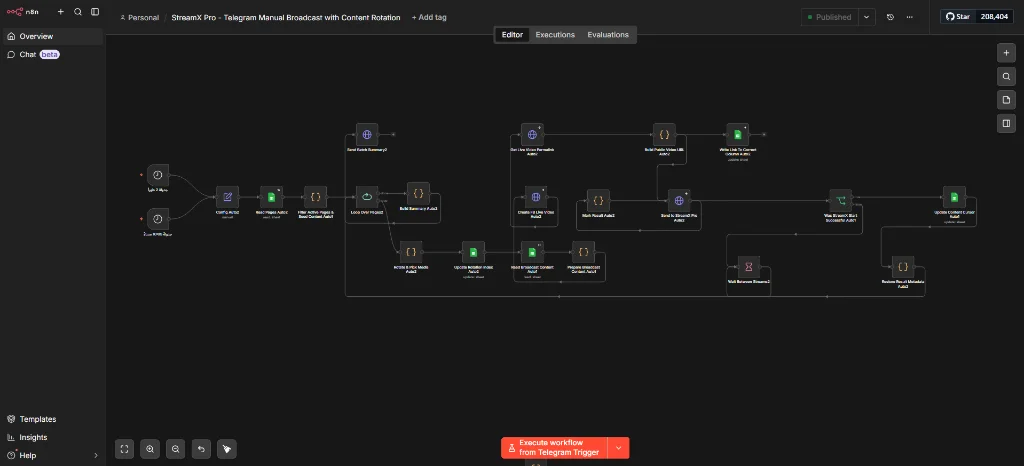
⚡ The Workflow Canvas Execution
This is the full workflow execution snapshot on the n8n canvas, from the two triggers through rotation, provisioning, dispatch, and logging:
🔒 Production Hardening Checklist
1. Keep Tokens Out of the Workflow
Do not leave page access tokens or bot tokens inside node parameters. Use n8n’s credential store where a node supports it, and treat the token column in your sheet as a secret: restrict who can open it. Before sharing a workflow JSON, sanitize it first, because exports can contain tokens, IDs, and pinned test data.
2. Space Out Multi-Page Batches
If you stream to many pages in one run, put a Wait node (a few seconds) inside the Split In Batches loop. This avoids firing many Graph API calls and many FFmpeg processes at the same instant.
3. Alert on Failure
Connect an error workflow, or use the Error Trigger node, to send a Telegram alert when the Graph API call or the stream dispatch fails. An unattended stream that fails silently is worse than one that fails loudly.
4. Check Meta’s Policies
Meta has rules about what can be broadcast live and about automated or repeated content. Read the current Live Video policies and make sure your content and your app permissions fit them before running this on real pages.
🔗 Related Engineering Blueprints
To further fortify your production automation stacks, explore our companion architectures:
- Need to clean sensitive tokens before committing workflows? Read How to Strip API Keys and Sanitize n8n Workflows for Public Export.
- Calling the WordPress API from n8n? See Fixing 401 Unauthorized in WordPress REST API with n8n and Application Passwords.
- Building autonomous publishing engines? Check Building an Automated Crypto News Aggregator & AI Auto-Blogger in n8n.
- Converting large document archives to WebP? Read High-Throughput PDF to WebP Batch Conversion with Python & PyMuPDF.
❓ Frequently Asked Questions (FAQ)
Can n8n run the FFmpeg encoding itself?
It can, through the Execute Command node, but a long-running encode inside the n8n process or container is a poor fit: it ties up resources and makes the workflow hard to monitor. Handing the job to a separate service, like StreamX Pro, keeps n8n responsible strictly for API orchestration.
How do I get a non-expiring Facebook Page Access Token?
Generate a user token in the Graph API Explorer with the permissions your app needs for pages and live video, exchange it for a long-lived user token with the oauth/access_token endpoint, then call GET /me/accounts. The page tokens in that response do not have an expiry date. Check Meta’s current documentation for the exact permissions, because they change.
What if the stream drops in the middle of a broadcast?
FFmpeg’s buffer (-bufsize 8000k) absorbs momentary network hiccups, but not a persistent disconnection. If the socket drops, n8n’s error handler triggers an alert to Telegram, allowing automated retries or manual intervention.
Why store the permalink instead of building the URL?
The permalink in the API response is what Facebook actually created for that broadcast. Building a URL from an ID by hand can break if the format changes, and it records nothing about whether the broadcast actually succeeded.