
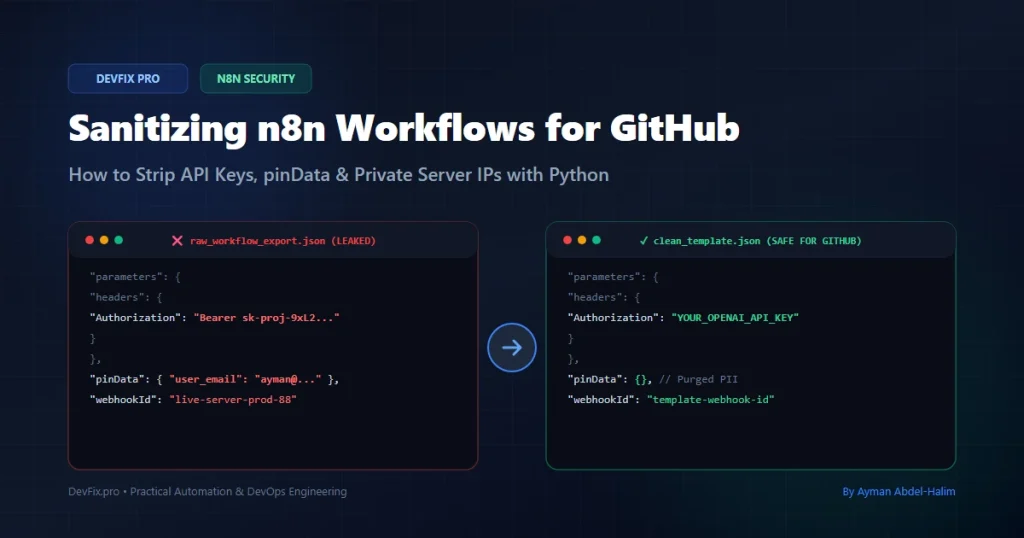
📌 Executive Summary (TL;DR)
Exporting n8n workflows to JSON is the standard way to backup pipelines, share templates on GitHub, or deliver client solutions. However, a standard n8n workflow export is not sanitized by default. Credentials configured in the Credentials Manager are not exported (only their name and ID are), but n8n frequently leaks sensitive data through:
pinDataObjects: Cached test execution data that can contain real customer emails, names, database records, and transaction payloads.- HTTP Request Nodes: Plaintext API keys and bearer tokens typed directly into custom headers or query parameters.
- Internal Network Identifiers: Webhook IDs, internal IP addresses (
http://185.225.x.x:5678), and custom domain routes. - Code Nodes: Variables and secrets hardcoded in custom JavaScript or Python scripts.
If you push an un-sanitized n8n JSON file to a public GitHub repository, automated credential-harvesting bots can find and abuse your keys within minutes, so treat any key that was ever committed as compromised.
In this guide, we look at the internal JSON structure of n8n, explain why naive regex find-and-replace can corrupt workflow graphs, and provide a recursive Python script that strips known secret formats, purges pinned PII, and stubs credentials for safe sharing.
🔍 The Anatomy of an n8n Secret Leak
To understand how secrets leak from n8n, we must look at how n8n structures its export format. When you click Workflow > Download, n8n serializes the active canvas into a single JSON tree containing nodes, connections, settings, and pinned data.
Here is a side-by-side comparison of where vulnerabilities hide:
┌────────────────────────────────────────────────────────────────────────┐
│                      n8n Export Vulnerability Matrix                    │
├──────────────────────┬────────────────────────────────┬────────────────┤
│ Component            │ Where the Secret Hides         │ Risk Level     │
├──────────────────────┼────────────────────────────────┼────────────────┤
│ pinData              │ Root-level node output cache   │ CRITICAL (PII) │
│ HTTP Request Nodes   │ node.parameters.headers        │ CRITICAL (API) │
│ Code Nodes           │ node.parameters.jsCode/pyCode  │ HIGH           │
│ Webhook URLs         │ node.parameters.path / options │ MEDIUM (Recon) │
│ Credentials Stubs    │ node.credentials.*.id          │ LOW (Metadata) │
└──────────────────────┴────────────────────────────────┴────────────────┘
Let’s inspect a raw JSON snippet from a typical leaky workflow (all values below are fake):
{
  "name": "Production Customer Sync",
  "nodes": [
    {
      "parameters": {
        "url": "https://api.openai.com/v1/chat/completions",
        "sendHeaders": true,
        "headerParameters": {
          "parameters": [
            {
              "name": "Authorization",
              "value": "Bearer sk-proj-9xL2k8mN4pQ1vR7wT0yZ..."
            }
          ]
        }
      },
      "id": "c1f7a0b3-9e42-4f11-8a9d-b8d21c33f4a0",
      "name": "OpenAI Enrichment",
      "type": "n8n-nodes-base.httpRequest",
      "typeVersion": 4.2,
      "position": [460, 300]
    }
  ],
  "pinData": {
    "OpenAI Enrichment": [
      {
        "json": {
          "customer_id": 10492,
          "email": "jane.doe@gmail.com",
          "phone": "+1 555 0100",
          "total_spent": "$4,250.00"
        }
      }
    ]
  }
}
Notice the two critical vulnerabilities in this single snippet:
- The Authorization header contains an active OpenAI project key (
sk-proj-...). - The
pinDatablock contains customer personally identifiable information (PII) that was cached when the developer tested the node on their canvas.
⚠️ The 4 Critical Leak Vectors in Detail
1. The pinData Trap (Real PII & Execution Dumps)
When developing a workflow in n8n, developers frequently test individual nodes. To prevent re-running earlier steps repeatedly, n8n allows you to “Pin data” to a node.
What many developers do not realize is that pinned data is stored in the workflow JSON under the root key pinData. If you test a node using live production data, such as Stripe webhooks, user registration data, or database queries, those exact customer records are saved in plaintext inside the exported .json file!
2. The HTTP Request Node Dilemma
The built-in HTTP Request node is one of the most versatile tools in n8n. However, developers often bypass the official Credentials Manager during rapid prototyping and instead type:
Authorization: Bearer sk-ant-api03-...
x-api-key: gsk_192837465...
directly into the Headers or Query Parameters input fields. When exported, these fields are written directly to the JSON file with zero obfuscation.
3. Custom Logic in Code Nodes
In complex automation pipelines, developers frequently use the Code Node (running JavaScript or Python) to manipulate arrays or format payloads. It is common to see hardcoded tokens inside the script logic:
// Inside a Code Node (Javascript)
const TELEGRAM_BOT_TOKEN = "718293847:AAHk98q7y...";
const CHAT_ID = "-1001928374";
Because this is inside an execution string (jsCode), scanners that only inspect specific JSON keys can miss it entirely.
4. Infrastructure Reconnaissance (webhookId & Server IPs)
n8n assigns unique IDs to webhook triggers (webhookId), and developers frequently test webhooks using their self-hosted server IP addresses (e.g., http://185.225.233.132:5678/webhook/test). Exposing these URLs publicly reveals your server’s address and lets anyone try to trigger your webhooks or probe the host.
🚫 Why Naive Search-and-Replace Fails (And Breaks Workflows)
When developers realize their JSON export contains secrets, their immediate reaction is often to write a quick bash command or simple regex script:
# WARNING: DO NOT DO THIS!
sed -i 's/sk-proj-[a-zA-Z0-9]*/REDACTED/g' workflow.json
Running a brute-force text replacement across an entire JSON file creates three major engineering problems:
A. Node Connection Corruption
n8n connects nodes by node name, so the names in connections must match the names of the nodes exactly:
"connections": {
  "OpenAI Enrichment": {
    "main": [
      [
        {
          "node": "Format Output",
          "type": "main",
          "index": 0
        }
      ]
    ]
  }
}
If your regex inadvertently matches or alters a node name, ID, or connection index, the imported workflow can end up with broken or missing connections.
B. Broken JSON Syntax & Escaping
If a replacement string contains unescaped quotes, backslashes, or control characters, the resulting file becomes syntactically invalid (JSONDecodeError), making it unusable.
C. Inability to Stub Credentials
The credentials block of a node holds a reference object with an id and a name. Replacing it with a plain "REDACTED" string breaks that structure, so the import can fail or the node can end up without a valid credential reference.
The Solution: Parse the file into an in-memory Python tree of dictionaries and lists, traverse it recursively, inspect only the string values (leaves), and replace secrets while preserving structural integrity.
🏗️ Architecture: How the Recursive Sanitizer Operates
Our Python sanitization pipeline runs in four stages:
Raw n8n workflow (.json)
        │
        ▼
1. json.load()  →  nested dicts / lists
        │
        ▼
2. Recursive tree walker, key by key
        │
        ├─ "pinData"                    →  {}   (purge cached test data)
        ├─ "credentials"                →  stub (id "1", generic name)
        ├─ "webhookId" / "instanceId"   →  template placeholder
        ├─ "documentId" / "spreadsheetId" / ...  →  YOUR_DOCUMENT_ID
        └─ any other string value       →  regex rules (stage 3)
        │
        ▼
3. Regex rules, most specific first
   Anthropic → OpenAI → Meta → Groq → Google AI → Telegram
   → Sheets URLs → e-mail addresses → hex secrets → raw-IP URLs
        │
        ▼
4. json.dump(indent=2)  →  safe JSON, same nodes and connections
💻 The Complete Production Script (sanitize_n8n.py)
Below is the complete Python script. It supports single files, entire directories, and a custom output folder, and it keeps going if one file in a batch is broken:
"""
n8n Workflow Secret Sanitizer
Author: Ayman Abdel-Halim (https://devfix.pro)

Cleans exported n8n workflow JSON files before you share them: strips pinned test
data, API keys, e-mail addresses, Google Sheets IDs, server-IP URLs and credential
references, without touching the node graph (node ids, names and connections).

Usage:
    python sanitize_n8n.py my_workflow.json              # -> sanitized/my_workflow.json
    python sanitize_n8n.py ./exports -o ./clean           # every *.json in a folder
"""

import argparse
import json
import re
import sys
from pathlib import Path

# (pattern, replacement) pairs applied to every string VALUE.
PATTERNS = [
    (r"sk-ant-[A-Za-z0-9_-]{20,}", "YOUR_ANTHROPIC_API_KEY"),            # Anthropic (before generic sk-)
    (r"sk-(?:proj-)?[A-Za-z0-9_-]{20,}", "YOUR_OPENAI_API_KEY"),         # OpenAI
    (r"EAA[A-Za-z0-9_-]{30,}", "YOUR_FACEBOOK_PAGE_ACCESS_TOKEN"),       # Meta Graph API
    (r"gsk_[A-Za-z0-9_-]{20,}", "YOUR_GROQ_API_KEY"),                    # Groq
    (r"AIzaSy[A-Za-z0-9_-]{30,}", "YOUR_GOOGLE_AI_API_KEY"),             # Google AI / Gemini
    (r"\b\d{8,12}:[A-Za-z0-9_-]{30,40}\b", "YOUR_TELEGRAM_BOT_TOKEN"),   # Telegram bot
    (r"https?://docs\.google\.com/spreadsheets/d/[A-Za-z0-9_-]+[^\s\"'}]*",
     "https://docs.google.com/spreadsheets/d/YOUR_SPREADSHEET_ID/edit"),
    (r"[A-Za-z0-9._%+-]+@[A-Za-z0-9.-]+\.[A-Za-z]{2,}", "user@example.com"),  # e-mail addresses
    (r"\b[a-f0-9]{32,64}\b", "YOUR_SECRET_HASH"),                        # generic hex secrets
    (r"https?://(?:\d{1,3}\.){3}\d{1,3}(?::\d+)?", "http://localhost:5678"),  # URLs that use a raw IP
]

# Keys whose value is an identifier of YOUR document, not a secret pattern we can regex.
DOCUMENT_ID_KEYS = {"documentId", "spreadsheetId", "sheetId", "sheetName", "folderId", "fileId"}
# Keys that carry structure and must never be rewritten by the generic hex rule.
STRUCTURAL_KEYS = {"id"}


def sanitize_string(text, key=None):
    """Apply every redaction pattern to a string value."""
    for pattern, replacement in PATTERNS:
        if key in STRUCTURAL_KEYS and replacement == "YOUR_SECRET_HASH":
            continue
        text = re.sub(pattern, replacement, text)
    return text


def redact_document_id(value):
    """Replace a Google/Drive id, including n8n's resource-locator format ({'__rl': true, 'value': ...})."""
    if isinstance(value, str):
        return "YOUR_DOCUMENT_ID" if len(value) >= 20 else value
    if isinstance(value, dict):
        cleaned = {}
        for k, v in value.items():
            if k == "value" and isinstance(v, str):
                cleaned[k] = "YOUR_DOCUMENT_ID"
            elif k in ("cachedResultUrl", "cachedResultName"):
                cleaned[k] = "YOUR_DOCUMENT_ID" if k == "cachedResultName" else sanitize_string(str(v))
            else:
                cleaned[k] = recursive_clean(v)
        return cleaned
    return value


def recursive_clean(obj, key=None):
    """Walk any JSON structure and clean it without altering the node graph."""
    if isinstance(obj, dict):
        cleaned = {}
        for k, v in obj.items():
            if k == "pinData":
                cleaned[k] = {}                                    # cached test payloads (real PII)
            elif k == "credentials" and isinstance(v, dict):
                cleaned[k] = {                                     # keep the type, drop the real id/name
                    cred_type: {"id": "1", "name": f"Configured {cred_type}"} for cred_type in v
                }
            elif k == "webhookId":
                cleaned[k] = "template-webhook-id"
            elif k == "instanceId":
                cleaned[k] = "template-instance-id"
            elif k in DOCUMENT_ID_KEYS:
                cleaned[k] = redact_document_id(v)
            else:
                cleaned[k] = recursive_clean(v, k)
        return cleaned
    if isinstance(obj, list):
        return [recursive_clean(item, key) for item in obj]
    if isinstance(obj, str):
        return sanitize_string(obj, key)
    return obj


def sanitize_file(src: Path, dst: Path):
    data = json.loads(src.read_text(encoding="utf-8"))
    dst.parent.mkdir(parents=True, exist_ok=True)
    dst.write_text(json.dumps(recursive_clean(data), indent=2, ensure_ascii=False), encoding="utf-8")
    print(f"OK  {src.name} -> {dst}")


def main():
    parser = argparse.ArgumentParser(description="Remove secrets from n8n workflow exports.")
    parser.add_argument("source", help="a workflow .json file or a folder of them")
    parser.add_argument("-o", "--out", default="sanitized", help="output folder (default: sanitized)")
    args = parser.parse_args()

    source, out = Path(args.source), Path(args.out)
    files = [source] if source.is_file() else sorted(source.glob("*.json"))
    if not files:
        sys.exit(f"No .json files found in {source}")

    failed = 0
    for f in files:
        try:
            sanitize_file(f, out / f.name)
        except (json.JSONDecodeError, OSError) as exc:
            failed += 1
            print(f"ERR {f.name}: {exc}")
    print(f"Done: {len(files) - failed} cleaned, {failed} failed.")


if __name__ == "__main__":
    main()
🔬 In-Depth Code Mechanics
Let’s break down the key engineering decisions in this script that make it safer than standard find-and-replace tools:
1. The Recursive Tree-Walker (recursive_clean)
The function checks the type of the incoming object:
- If
dict: It iterates over key-value pairs. Crucially, it handles specific n8n keys (pinData,credentials,webhookId,instanceId, document IDs) before falling back to generic cleaning. - If
list: It recurses into each element, which covers n8n’s nested connection arrays and node lists. - If
str: Only when it reaches a leaf string does it run the regex rules (sanitize_string). - If primitive (int, bool, float, None): It returns the value as-is.
2. Intelligent Credential Stubbing
When someone imports an n8n workflow that uses a service like Google Sheets or OpenAI, each node carries a credential reference. The script keeps the credential type and replaces the real ID and name with a neutral stub:
{"id": "1", "name": f"Configured {cred_type}"}
Instead of deleting the credentials block entirely, this keeps the node’s structure intact. After importing, the recipient simply selects their own credential on each node.
3. Order-Dependent Regex Matching
The order of the rules in PATTERNS matters:
- Anthropic keys (
sk-ant-...) must run before the genericsk-...OpenAI rule. Both start withsk-, so if the OpenAI rule ran first it would swallow Anthropic keys and label them wrongly. - E-mail addresses are redacted without exceptions, including
gmail.com, because those are the addresses most likely to leak in real exports. - The generic hex rule (
\b[a-f0-9]{32,64}\b) runs last, so it only catches what the specific rules did not already handle.
4. Key-Based Redaction for Google IDs
A regex that looks for "documentId": "..." never matches after json.load(), because the key and the value are separate objects in memory. The script therefore redacts documentId, spreadsheetId, folderId and similar keys by name, and it also handles n8n’s resource-locator format ({"__rl": true, "value": "..."}).
🛠️ Step-by-Step Tutorial: Sanitizing a Real Workflow
Let’s walk through an end-to-end example of sanitizing an automation pipeline before pushing it to GitHub.
Step 1: Export Your Workflow from n8n
- Open your workflow in the n8n editor.
- In the top right menu, click the … (Options) button.
- Select Download.
- Save the file locally as
lead_intake_production.json.
Step 2: Run the Sanitizer via Command Line
Open your terminal and run the script on the file. Use -o to choose the output folder (the default is sanitized):
$ python sanitize_n8n.py lead_intake_production.json -o sanitized
To clean a whole folder of exports at once, pass the folder instead of a file:
$ python sanitize_n8n.py ./exports -o ./clean
Step 3: Verify the Result
Never trust the output blindly. Check that the placeholders are in place and that the original secrets are gone. This is the real output from a test workflow containing a fake OpenAI key, a Telegram token, a private-IP URL and pinned data:
$ python sanitize_n8n.py lead_intake_production.json -o sanitized
OK  lead_intake_production.json -> sanitized/lead_intake_production.json
Done: 1 cleaned, 0 failed.

$ grep -nE "YOUR_|template-|example.com|pinData" sanitized/lead_intake_production.json
12: "value": "Bearer YOUR_OPENAI_API_KEY"
28: "jsCode": "const TELEGRAM_BOT_TOKEN = \"YOUR_TELEGRAM_BOT_TOKEN\";\nconst ADMIN = \"user@example.com\";\nreturn items;"
43: "value": "YOUR_DOCUMENT_ID",
56: "webhookId": "template-webhook-id",
89: "pinData": {},
91: "instanceId": "template-instance-id"

$ grep -cE "sk-|185\.225|jane\.doe|1AbCd" sanitized/lead_intake_production.json
0
In the same test, the node IDs and the connections block were identical before and after sanitizing.
Step 4: Verify Re-Importability into n8n
- Open a fresh or staging n8n workspace.
- Click Workflow > Import from File.
- Select
sanitized/lead_intake_production.json. - Check that all nodes and connecting lines render, then select your own credential on each node that needs one.
🛡️ Production Best Practices Beyond Sanitization
Automated sanitization is a safety net. Good habits keep secrets out of workflows in the first place:
1. Use the Credentials Manager, Not Typed-In Headers
In the HTTP Request node, choose a predefined or generic credential type instead of typing an Authorization header by hand. Credentials stay in n8n’s database and are not written into the exported JSON.
2. Consider Environment Variables (Check Your Version)
You can pass secrets into the container through environment variables:
services:
  n8n:
    image: n8nio/n8n:latest
    environment:
      - CUSTOM_OPENAI_KEY=${OPENAI_KEY}
and reference them with an expression such as {{ $env.CUSTOM_OPENAI_KEY }}. Note that newer n8n versions can block $env access inside nodes by default (see N8N_BLOCK_ENV_ACCESS_IN_NODE in the n8n docs), so confirm how your version behaves before relying on this.
3. Implement Git Pre-Commit Hooks
Install detect-secrets in your repository to catch secrets before they are committed:
pip install detect-secrets pre-commit
detect-secrets scan > .secrets.baseline
Then add this to .pre-commit-config.yaml and run pre-commit install:
repos:
  - repo: https://github.com/Yelp/detect-secrets
    rev: v1.5.0
    hooks:
      - id: detect-secrets
        args: ['--baseline', '.secrets.baseline']
❓ Frequently Asked Questions (FAQ)
Are credentials included in an n8n workflow export?
No, the secret values are not. Accounts stored in n8n’s Credentials Manager live in your database, and the export only contains a reference (the credential’s name and ID). However, any secret you typed manually into HTTP Request headers, query strings, Webhook URLs, or Code nodes is exported in plaintext.
Will running this script break my workflow node connections?
No. Because the script parses the workflow into Python dictionaries and lists rather than performing a flat string search, node IDs, positions, and the connections block stay untouched. In the test above they were identical before and after.
Can I add custom regex patterns for private enterprise APIs?
Yes. Append a tuple to the PATTERNS list in the form (r"your_regex_here", "REPLACEMENT_TEXT"). Put specific patterns before generic ones.
What happens if my workflow uses code inside a Code Node?
The script scans every string value, including the jsCode and pyCode parameters. Any hardcoded key that matches one of the rules (such as an OpenAI key or a Telegram token) is replaced with a placeholder.
Is the sanitizer enough on its own?
No. It only recognizes the secret formats listed in PATTERNS, so a custom or unusual token can slip through. Always review the output (or diff it against the original) before you publish, and if a real key ever reached a public repository, rotate it immediately. Deleting the commit is not enough.
🚀 Up Next in Python Automation: Once your workflows are sanitized and secured, discover how to build high-throughput data pipelines in our companion guide: Building a Resilient Bulk Downloader in Python (Zero Memory Leaks) to stream thousands of assets concurrently with zero crashes.
Written by Ayman Abdel-Halim, AI Automation & Integration Developer at DevFix Pro.



4 thoughts on “How to Sanitize and Export n8n Workflows for GitHub Without Leaking Secrets (Complete Python Guide)”